
Welcome to Scripts.com!
Scripts.com is a huge collection of movie scripts, screenplays and transcripts from famous and not-so-famous screen writers from around the world — collaboratively published by amateur script writers and contributing editors.
Navigate through our scripts database alphabetically or simply search by keywords. You can submit a new script, discuss and rate existing scripts, and even translate pieces to many common and not-so-common languages.
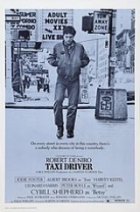
- Year:
- 1976
- 854,275 Views
TRAVIS BICKLE, age 26, lean, hard, the consummate loner. On
the surface he appears good-looking, even handsome; he has a
quiet steady look and a disarming smile which flashes from
nowhere, lighting up his whole face. But behind that smile,
around his dark eyes, in his gaunt cheeks, one can see the
ominous stains caused by a life of private fear, emptiness
and loneliness. He seems to have wandered in from a land
where it is always cold, a country where the inhabitants
seldom speak. The head moves, the expression changes, but
the eyes remain ever-fixed, unblinking, piercing empty space.
Travis is now drifting in and out of the New York City night
life, a dark shadow among darker shadows. Not noticed, no
reason to be noticed, Travis is one with his surroundings.
He wears rider jeans, cowboy boots, a plaid western shirt
and a worn beige Army jacket with a patch reading, "King
Kong Company 1968-70".
He has the smell of sex about him: Sick sex, repressed sex,
lonely sex, but sex nonetheless. He is a raw male force,
driving forward; toward what, one cannot tell. Then one
looks closer and sees the evitable. The clock sprig cannot
be wound continually tighter. As the earth moves toward the
sun, Travis Bickle moves toward violence.
FILM OPENS on EXT. of MANHATTAN CAB GARAGE. Weather-beaten
sign above driveway reads, "Taxi Enter Here". Yellow cabs
scuttle in and out. It is WINTER, snow is piled on the
curbs, the wind is howling.
INSIDE GARAGE are parked row upon row of multi-colored taxis.
Echoing SOUNDS of cabs idling, cabbies talking. Steamy
breath and exhaust fill the air.
INT. CORRIDOR of cab company offices. Lettering on ajar door
reads:
PERSONAL OFFICE:
Marvis Cab Company
Blue and White Cab Co.
Acme Taxi
Dependable Taxi Services
JRB Cab Company
Speedo Taxi Service
2.
SOUND of office busywork: shuffling, typing, arguing.
PERSONAL OFFICE is a cluttered disarray. Sheets with heading
"Marvis, B&W, Acme" and so forth are tacked to crumbling
plaster wall:
It is March. Desk is cluttered with forms,reports and an old upright Royal typewriter.
Dishelved middle-aged New Yorker looks up from the desk. We
CUT IN to ongoing conversation between the middle-aged
PERSONNEL OFFICER and a YOUNG MAN standing in front on his
desk.
The young man is TRAVIS BICKLE. He wears his jeans, boots
and Army jacket. He takes a drag off his unfiltered cigarette.
The PERSONNEL OFFICER is beat and exhausted: he arrives at
work exhausted. TRAVIS is something else again. His intense
steely gaze is enough to jar even the PERSONNEL OFFICER out
of his workaday boredom.
PERSONNEL OFFICER (O.S.)

Translation
Translate and read this script in other languages:
Select another language:
- - Select -
- 简体中文 (Chinese - Simplified)
- 繁體中文 (Chinese - Traditional)
- Español (Spanish)
- Esperanto (Esperanto)
- 日本語 (Japanese)
- Português (Portuguese)
- Deutsch (German)
- العربية (Arabic)
- Français (French)
- Русский (Russian)
- ಕನ್ನಡ (Kannada)
- 한국어 (Korean)
- עברית (Hebrew)
- Gaeilge (Irish)
- Українська (Ukrainian)
- اردو (Urdu)
- Magyar (Hungarian)
- मानक हिन्दी (Hindi)
- Indonesia (Indonesian)
- Italiano (Italian)
- தமிழ் (Tamil)
- Türkçe (Turkish)
- తెలుగు (Telugu)
- ภาษาไทย (Thai)
- Tiếng Việt (Vietnamese)
- Čeština (Czech)
- Polski (Polish)
- Bahasa Indonesia (Indonesian)
- Românește (Romanian)
- Nederlands (Dutch)
- Ελληνικά (Greek)
- Latinum (Latin)
- Svenska (Swedish)
- Dansk (Danish)
- Suomi (Finnish)
- فارسی (Persian)
- ייִדיש (Yiddish)
- հայերեն (Armenian)
- Norsk (Norwegian)
- English (English)
Citation
Use the citation below to add this script to your bibliography:
Style:MLAChicagoAPA
"Scripts.com" Scripts.com. STANDS4 LLC, 2024. Web. 24 Apr. 2024. <https://www.scripts.com/>.












Discuss everything about Scripts.com with the community:
Report Comment
We're doing our best to make sure our content is useful, accurate and safe.
If by any chance you spot an inappropriate comment while navigating through our website please use this form to let us know, and we'll take care of it shortly.
Attachment
You need to be logged in to favorite.
Log In